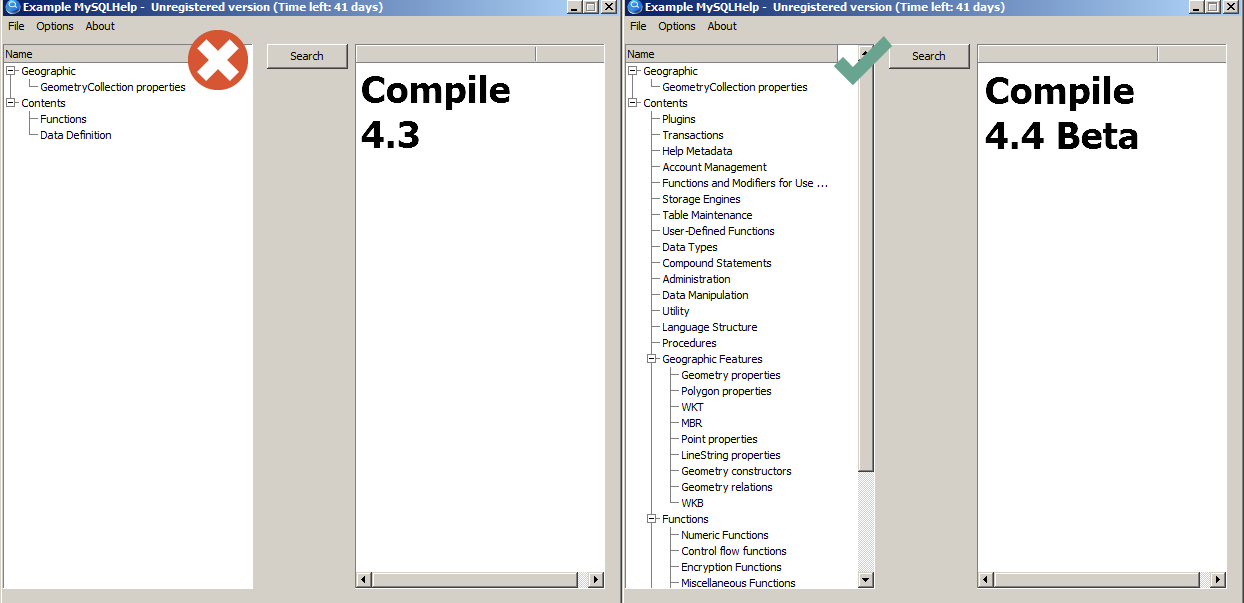
windows 10 has default right click
send to >>> compressed file(ziped) folder
Or
Extract All
i will MVD have this function pure not use third party or External program
Please !
You are not logged in. Please login or register.

My Visual Database → Posts by prahousefamily
windows 10 has default right click
send to >>> compressed file(ziped) folder
Or
Extract All
i will MVD have this function pure not use third party or External program
Please !
I will little help MVD Community create multiple tdataset in report design by use value string in Tmemo custom syntax
Syntax
<dataset name"xxx">sql</dataset>
Example Image
Example Image With Design & Preview

Open Code
//Fix 2018-09-06 Script Example Report Flag

procedure Form1_Button3_OnClick (Sender: TObject; var Cancel: boolean);
var
frxDBDatasets : array[0..999] OF TfrxDBDataset;
dts : array[0..999] OF Tdataset;
i : integer ;
dtssql : string;
dtsname : String;
begin
    Form1.frxReport.Clear;
    Form1.frxReport.DataSets.Clear;
    For i := 0 To Form1.ComboBox1.Items.Count - 1 Do
    begin
        //test show message
        dtsname := (
        Copy(
        Form1.ComboBox1.Items[i],
        Pos('<dataset name"',Form1.ComboBox1.Items[i])+14,
        Pos('">',Form1.ComboBox1.Items[i])-(Pos('<dataset name"',Form1.ComboBox1.Items[i])+14),
        )
        );
        Showmessage(dtsname);
        dtssql :=
        Copy(
        Form1.ComboBox1.Items[i],
        (Pos('">',Form1.ComboBox1.Items[i])+2),
        Pos('</dataset>',Form1.ComboBox1.Items[i]) - (Pos('">',Form1.ComboBox1.Items[i])+2)
        ) ;
        SQLQuery(dtssql, dts[i]);
        frxDBDatasets[i] := TfrxDBDataset.Create(Form1);
        frxDBDatasets[i].UserName        := dtsname;
        frxDBDatasets[i].CloseDataSource := True;
        frxDBDatasets[i].OpenDataSource  := True;
        frxDBDatasets[i].DataSet         := dts[i];
        Form1.frxReport.DataSets.Add(frxDBDatasets[i]);
    end;
    For i := 0 To Form1.ComboBox1.Items.Count - 1 Do
    frxDBDatasets[i].DataSet.Close ;

    Form1.frxReport.LoadFromFile(ExtractFilePath(Application.ExeName)+'Report\test.fr3');
    Form1.frxReport.ShowReport;

    For i := 0 To Form1.ComboBox1.Items.Count - 1 Do
    frxDBDatasets[i].DataSet.Free ;

end;

procedure Form1_Button2_OnClick (Sender: TObject; var Cancel: boolean);
var
st_temp : String;
vt_name : tstringlist;
result_sql : String;
get_x,get_y : Integer;
para_x,para_y : Integer;
paraname : string;
dts : array[0..999] of ttoolbar;
dtsi: integer;
begin
//start
    st_temp := Form1.Memo1.Text ;
    result_sql := Form1.Memo1.Text;
    vt_name := tstringlist.Create ;
    vt_name.Clear ;
    Form1.ComboBox1.Items.clear ;
    Repeat
    begin
        get_x    := Pos('<dataset name"',st_temp);
        st_temp  := Copy(st_temp,get_x,Length(st_temp));
        get_y    := Pos('</dataset>',st_temp) ;
        paraname := Copy(st_temp,1,get_y+9);
        IF Pos(paraname,vt_name.Text) <= 0 Then
        vt_name.Add(paraname) ;
        Form1.ComboBox1.Items.add(paraname);
        st_temp  := copy(st_temp,get_y+10,Length(st_temp) );
    end;
    until Pos('<dataset name"',st_temp) <= 0;
end;

procedure Form1_Button1_OnClick (Sender: TObject; var Cancel: boolean);
var
frxDBDatasets : array[0..999] OF TfrxDBDataset;
dts : array[0..999] OF Tdataset;
i : integer ;
dtssql : string;
dtsname : String;
begin
    Form1.frxReport.Clear;
    Form1.frxReport.DataSets.Clear;
    For i := 0 To Form1.ComboBox1.Items.Count - 1 Do
    begin
        //test show message
        dtsname := (
        Copy(
        Form1.ComboBox1.Items[i],
        Pos('<dataset name"',Form1.ComboBox1.Items[i])+14,
        Pos('">',Form1.ComboBox1.Items[i])-(Pos('<dataset name"',Form1.ComboBox1.Items[i])+14),
        )
        );
        Showmessage(dtsname);
        dtssql :=
        Copy(
        Form1.ComboBox1.Items[i],
        (Pos('">',Form1.ComboBox1.Items[i])+2),
        Pos('</dataset>',Form1.ComboBox1.Items[i]) - (Pos('">',Form1.ComboBox1.Items[i])+2)
        ) ;
        SQLQuery(dtssql, dts[i]);
        frxDBDatasets[i] := TfrxDBDataset.Create(Form1);
        frxDBDatasets[i].UserName        := dtsname;
        frxDBDatasets[i].CloseDataSource := True;
        frxDBDatasets[i].OpenDataSource  := True;
        frxDBDatasets[i].DataSet         := dts[i];
        Form1.frxReport.DataSets.Add(frxDBDatasets[i]);
    end;
    Form1.frxReport.LoadFromFile(ExtractFilePath(Application.ExeName)+'Report\test.fr3');
    Form1.frxReport.DesignReport;
    For i := 0 To Form1.ComboBox1.Items.Count - 1 Do
    frxDBDatasets[i].free ;
end;
procedure Form1_ComboBox1_OnChange (Sender: TObject);
begin
    Form1.Memo2.Text :=
    Copy(
    Form1.ComboBox1.Text,
    Pos('<dataset name"',Form1.ComboBox1.Text)+14,
    Pos('">',Form1.ComboBox1.Text)-(Pos('<dataset name"',Form1.ComboBox1.Text)+14),
    );
    Form1.Memo3.Text :=
    Copy(
    Form1.ComboBox1.Text,
    (Pos('">',Form1.ComboBox1.Text)+2),
    Pos('</dataset>',Form1.ComboBox1.Text) - (Pos('">',Form1.ComboBox1.Text)+2)
    );
    Form1.TableGrid1.ClearRows;
    Form1.TableGrid1.dbSQL := Form1.Memo3.Text;
    Form1.TableGrid1.dbSQLExecute;
end;
procedure Form1_OnShow (Sender: TObject; Action: string);
var
st_temp : String;
vt_name : tstringlist;
result_sql : String;
get_x,get_y : Integer;
para_x,para_y : Integer;
paraname : string;
dts : array[0..999] of ttoolbar;
dtsi: integer;
begin
    Form1.Memo1.Lines.LoadFromfile(ExtractFilePath(Application.exename)+'\sql.txt');
    //start
    st_temp := Form1.Memo1.Text ;
    result_sql := Form1.Memo1.Text;
    vt_name := tstringlist.Create ;
    vt_name.Clear ;
    Repeat
    begin
        get_x    := Pos('<dataset name"',st_temp);
        st_temp  := Copy(st_temp,get_x,Length(st_temp));
        get_y    := Pos('</dataset>',st_temp) ;
        paraname := Copy(st_temp,1,get_y+9);
        IF Pos(paraname,vt_name.Text) <= 0 Then
        vt_name.Add(paraname) ;
        Form1.ComboBox1.Items.add(paraname);
        st_temp  := copy(st_temp,get_y+10,Length(st_temp) );
    end;
    until Pos('<dataset name"',st_temp) <= 0;
end;
begin
end.Fix 2018-08-02
---- Check variable before execute
IF vt_name[para_x] <> '' ThenFull Fix Code
//Advance Like Navicat
procedure Form1_Button2_OnClick (Sender: TObject; var Cancel: boolean);
var
st_temp : String;
vt_name : tstringlist;
result_sql : String;
get_x,get_y : Integer;
para_x,para_y : Integer;
paraname : string;
begin
    st_temp := Form1.Memo3.Text ;
    result_sql := Form1.Memo3.Text;
    vt_name := tstringlist.Create ;
    vt_name.Clear ;
    Repeat
    begin
        get_x    := Pos('[$',st_temp);
        st_temp  := Copy(st_temp,get_x,Length(st_temp));
        get_y    := Pos(']',st_temp) ;
        paraname := Copy(st_temp,1,get_y);
        IF Pos(paraname,vt_name.Text) <= 0 Then
        vt_name.Add(paraname) ;
        st_temp  := copy(st_temp,get_y+1,Length(st_temp) );
    end;
    until Pos('[$',st_temp) <= 0;
    For para_x := 0 To  vt_name.Count -1 Do
    Begin
IF vt_name[para_x] <> '' Then
        result_sql :=
        ReplaceStr(result_sql ,vt_name[para_x],
        '"'+
        InputBox('Input Parameter',ReplaceStr(ReplaceStr(vt_name[para_x],'[$',''),']','') ,'')+
        '"'
        );
    end;
    Form1.TableGrid1.dbSQL := result_sql;
    Form1.TableGrid1.dbSQLExecute ;
    vt_name.Clear ;
End;
// Core Script Search Parameter And Distinct Insert In Stringlist
procedure Form1_Button1_OnClick (Sender: TObject; var Cancel: boolean);
var
st_temp : String;
get_x,get_y : Integer;
paraname : string;
begin
    Form1.Memo2.Clear;
    st_temp  := Form1.Memo1.Text ;
    Repeat
    begin
        get_x    := Pos('[$',st_temp);
        st_temp  := Copy(st_temp,get_x,Length(st_temp));
        get_y    := Pos(']',st_temp) ;
        paraname := Copy(st_temp,1,get_y);
        IF Pos(paraname,Form1.Memo2.Text) <= 0 Then
        Form1.Memo2.Lines.Add(paraname) ;
        st_temp  := copy(st_temp,get_y+1,Length(st_temp) );
    end;
    until Pos('[$',st_temp) <= 0;
End;
procedure Form1_OnShow (Sender: TObject; Action: string);
begin
    Form1.Memo1.lines.loadFromFile('Lorem.txt');
    Form1.Memo3.Text :=
    'SELECT' + #13#10 +
    '    CAST ([$paraname1] AS text) AS paraname1,' + #13#10 +
    '    CAST ([$paraname2] AS text) AS paraname2,' + #13#10 +
    '    CAST ([$paraname1] AS text) AS paraname3_like_paraname1';
end;
begin
end. requirement 4.5 beta add component TAdvMemo like tab script in MVD
For
- Show line number
- Show count position character
look easy when edit note or memo
Help please !

- added function to resize graphic files
Decrease file size in capacity disk ?
Or
Change Size Width ,Height Image ?
I Will MVD Community Happy In This Script Help Insert parameter in statement
Use applied InputBox Function in MVD Insert in statement query string like feature Navicat Query Parameters
Navicat Feature
Query Parameters
Query Builder and Query Editor both support using of parameters inside the query text. You can set query parameters to add variable values to a query each time you run it. The parameter should appear as an identifier with $ at its beginning, quote with [ ], e.g. [$any_name].
Execute the query and the Input Parameter Dialog is provided for you to enter the desired data you wish to search.
Navicat Screen 
MVD Screen Like Navicat 
Open Code Script
//Advance Like Navicat
procedure Form1_Button2_OnClick (Sender: TObject; var Cancel: boolean);
var
st_temp : String;
vt_name : tstringlist;
result_sql : String;
get_x,get_y : Integer;
para_x,para_y : Integer;
paraname : string;
begin
    st_temp := Form1.Memo3.Text ;
    result_sql := Form1.Memo3.Text;
    vt_name := tstringlist.Create ;
    vt_name.Clear ;
    Repeat
    begin
        get_x    := Pos('[$',st_temp);
        st_temp  := Copy(st_temp,get_x,Length(st_temp));
        get_y    := Pos(']',st_temp) ;
        paraname := Copy(st_temp,1,get_y);
        IF Pos(paraname,vt_name.Text) <= 0 Then
        vt_name.Add(paraname) ;
        st_temp  := copy(st_temp,get_y+1,Length(st_temp) );
    end;
    until Pos('[$',st_temp) <= 0;
    For para_x := 0 To  vt_name.Count -1 Do
    Begin
        result_sql :=
        ReplaceStr(result_sql ,vt_name[para_x],
        '"'+
        InputBox('Input Parameter',ReplaceStr(ReplaceStr(vt_name[para_x],'[$',''),']','') ,'')+
        '"'
        );
    end;
    Form1.TableGrid1.dbSQL := result_sql;
    Form1.TableGrid1.dbSQLExecute ;
    vt_name.Clear ;
End;
// Core Script Search Parameter And Distinct Insert In Stringlist
procedure Form1_Button1_OnClick (Sender: TObject; var Cancel: boolean);
var
st_temp : String;
get_x,get_y : Integer;
paraname : string;
begin
    Form1.Memo2.Clear;
    st_temp  := Form1.Memo1.Text ;
    Repeat
    begin
        get_x    := Pos('[$',st_temp);
        st_temp  := Copy(st_temp,get_x,Length(st_temp));
        get_y    := Pos(']',st_temp) ;
        paraname := Copy(st_temp,1,get_y);
        IF Pos(paraname,Form1.Memo2.Text) <= 0 Then
        Form1.Memo2.Lines.Add(paraname) ;
        st_temp  := copy(st_temp,get_y+1,Length(st_temp) );
    end;
    until Pos('[$',st_temp) <= 0;
End;
procedure Form1_OnShow (Sender: TObject; Action: string);
begin
    Form1.Memo1.lines.loadFromFile('Lorem.txt');
    Form1.Memo3.Text :=
    'SELECT' + #13#10 +
    '    CAST ([$paraname1] AS text) AS paraname1,' + #13#10 +
    '    CAST ([$paraname2] AS text) AS paraname2,' + #13#10 +
    '    CAST ([$paraname1] AS text) AS paraname3_like_paraname1';
end;
begin
end. How To Replace Text In '['+Alltext+']'
Example Original text
[Lorem Ipsum] is [simply dummy] text of the printing [and] typesetting industry. Lorem Ipsum has been the industry's standard dummy text ever since the 1500s, when an unknown printer took a galley of type and scrambled it to make a type specimen book. It has survived not only five centuries, but also the leap into electronic typesetting, remaining essentially unchanged. It was popularised in the 1960s with the release of Letraset sheets containing Lorem Ipsum passages, and more recently with desktop publishing software like Aldus PageMaker including versions of Lorem Ipsum.
For Result
XXX is XXX text of the printing XXX typesetting industry. Lorem Ipsum has been the industry's standard dummy text ever since the 1500s, when an unknown printer took a galley of type and scrambled it to make a type specimen book. It has survived not only five centuries, but also the leap into electronic typesetting, remaining essentially unchanged. It was popularised in the 1960s with the release of Letraset sheets containing Lorem Ipsum passages, and more recently with desktop publishing software like Aldus PageMaker including versions of Lorem Ipsum.
How To use function Or Edit code ???
Hi derek Thank You Example Sorted Order In Treeview
It Code Easy Understand use SQL fix It..
Um... i have little If i will to re order NODE by Name not ID
How to edit script ???
From
http://myvisualdatabase.com/forum/viewtopic.php?id=4257
How to edit script for show combobox like textbox same inputbox
function InputBox(,,) and setting is var public function for use in MVD
How can edit ???
function InputComboBox('Dialog Caption','Dialog Lable','ComboboxItemsList','SelectComboboxItem') Like Same Picture 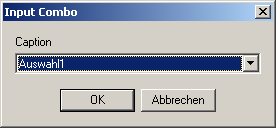
reference from http://www.swissdelphicenter.ch/en/showcode.php?id=2422
how to set Tstatus and add width panel auto width
StatusBar.Panels.Items[0].Width := Textwidth + 16 help me please !
Thank You manixs2013 & carlo_dj
Effect By
- Form Set KeyPreview := True >> manixs2013
- Change Script Follow >> carlo_dj
procedure Form1_OnKeyDown (Sender: TObject; var Key: Word; Shift, Alt, Ctrl: boolean);
begin
 if Key=13 then Form1.SetFocusNextControl;
end;
begin
Form1.KeyPreview := True ;
end.Change Key Tab To Enter For next Control
From Code in MVD 4.4
procedure Form1_Ctrl_OnKeyDown (Sender: string; var Key: Word; Shift, Alt, Ctrl: boolean);
begin
    if Key=13 then Form1.SetFocusNextControl;
end;
No Effect !
Bug????
I try edit script but error for click select sex male,female component checkbox
how to edit script ???
procedure Form1_CheckBox2_OnClick (Sender: string);
begin
Form1.CheckBox1.State := cbUnchecked ;
Form1.CheckBox2.State := cbchecked ;
Form1.Color := ClGreen ;
end;

procedure Form1_CheckBox1_OnClick (Sender: string);
begin
Form1.CheckBox1.State := cbchecked ;
Form1.CheckBox2.State := cbUnchecked ;
Form1.Color := ClBlue ;
end;

begin

end.Reference Original Example https://www.heidisql.com/
The author: Ansgar Becker
Original Screen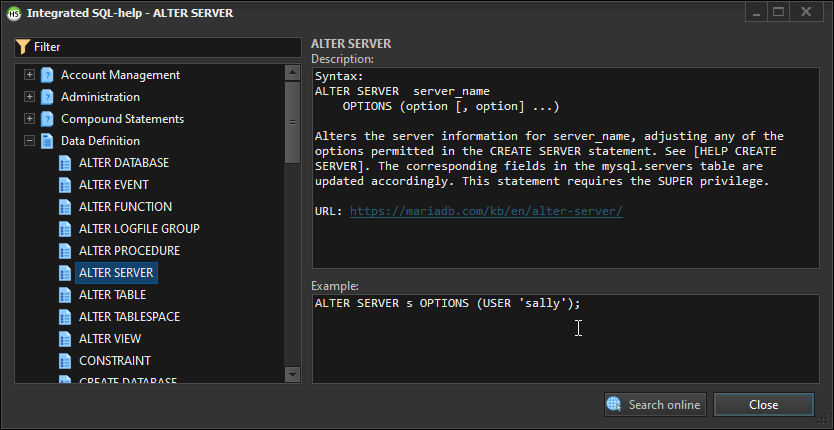
MVD Screen
Learn Education Component
- Treeview
- Tsplitter
- Tdataset
- Tstringlist
Compile MVD Version 4.4 beta
How to set Tmemo Or Script Show Original Content From Database ?
New line,tab Or Etc Help me please Like HeidiSQL Show Content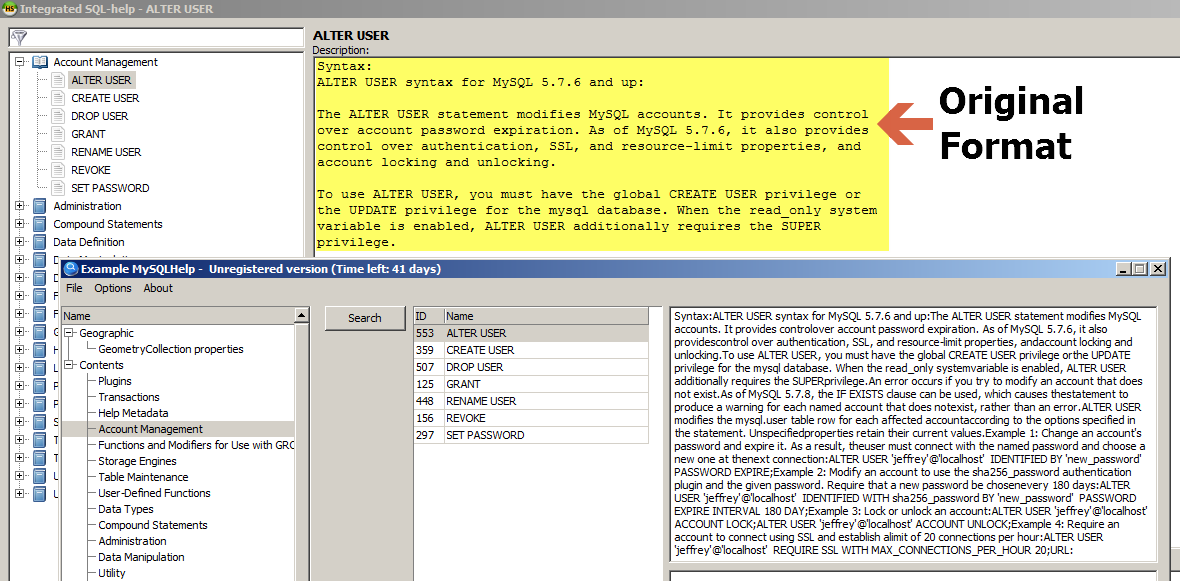
Example 4.4 Beta Compile Only
Help ME Please !!!
How To add sub items Treenode in items select by script help me please !
maximun show add items lv1
if add item more than lv 1 how to edit ??


OK Fix It Work!
Thank You...
UM... little Question It because Show false ?
- Component in MVD not support
or
- Text File in my Pc
How to Fix
Text Encode Go And Back
Ansi <> Unicode<>UTF8
Or Add TEncoding Component Class ,Add Function For converter ???
Because When to read string or Insert to database it false ...
Help Me please For Support more language !
How to Fix script load text for support utf8 !
procedure Form1_Button1_OnClick (Sender: TObject; var Cancel: boolean);
var
opendialog : topendialog ;
begin
opendialog := topendialog.create(form1) ;
if opendialog.execute then
form1.Memo1.Lines.loadfromfile(opendialog.filename);
opendialog.free
end;
begin
end.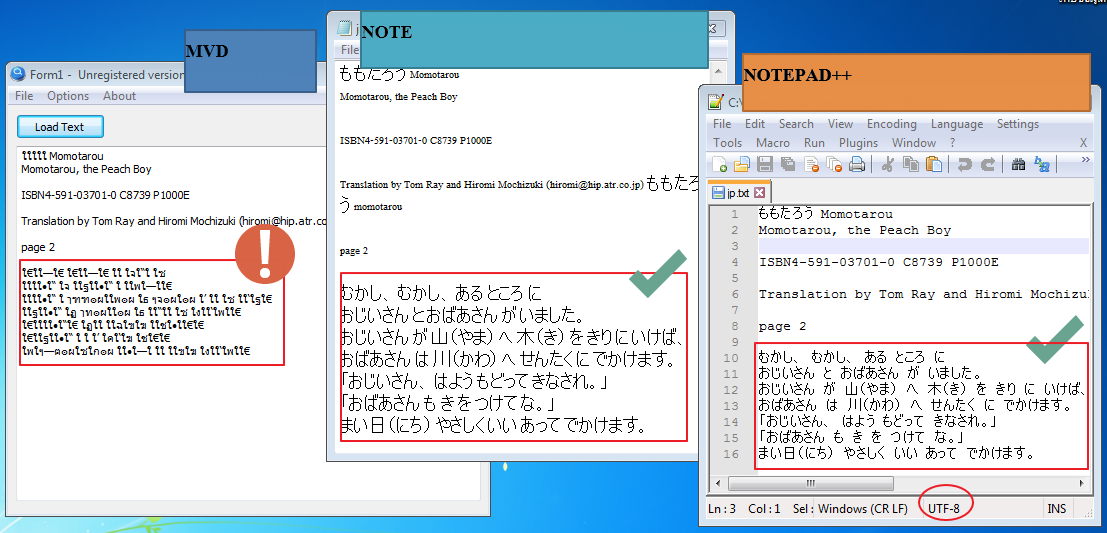
Text Example(jp utf8.txt)
ももたろう Momotarou
Momotarou, the Peach Boy

ISBN4-591-03701-0 C8739 P1000E

Translation by Tom Ray and Hiromi Mochizuki (hiromi@hip.atr.co.jp) ももたろう momotarou

page 2

むかし、 むかし、 ある ところ に
おじいさん と おばあさん が いました。
おじいさん が 山(やま) へ 木(き) を きり に いけば、
おばあさん は 川(かわ) へ せんたく に でかけます。
「おじいさん、 はよう もどって きなされ。」
「おばあさん も き を つけて な。」
まい日(にち) やさしく いい あって でかけます。Easy Example :
http://wiki.freepascal.org/TSplitter


procedure Form1_OnShow (Sender: TObject; Action: string);
var
splitter1,splitter2 : Tsplitter;
begin
Form1.Panel2.Align:= alLeft ;
Form1.Panel3.Align:= alClient ;
Splitter1:=TSplitter.Create(Form1);
with Splitter1 do begin
Splitter1.Name:='Splitter1';
Splitter1.Parent:= form1.Panel1;
Splitter1.Left:=100;
Splitter1.Align:=alLeft;
end;
Form1.Panel4.Align:= alTop ;
Form1.Panel5.Align:= alClient ;
Splitter2:=TSplitter.Create(Form1);
with Splitter2 do begin
Splitter2.Name:='Splitter2';
Splitter2.Parent:= form1.Panel3;
//Splitter1.Left:=100;
Splitter2.Align:=alTop;
end;
end;
begin
end.I try test Component Map In MVD 4.0 Beta + world database
Question how to update edit.text when maker in map real time
Or Can Show Detail label upper pin in map ???
-----
Example Error
When Cal In Report

in report if want ratio calculator
(A/B)*100
(5/200)*100 = 2.5
-- OK Normal result Not Error
(A <>0 or A not null ) AND (B <>0 or B not null )
BUT
(0/100)*100 or (null/100)*100 or (null/null)*100
-- result Error And Report Engine Stop Running
how to protect or check value A,B before cal ?
How to set size toolbutton in toolbar increase Height ,Width ???
Help me please !!!

i try input code but not effect
var
toolbar :ttoolbar;
toolbutton0 : ttoolbutton;
begin
toolbar := ttoolbar.create(form1);
toolbar.parent := form1.Panel2;
toolbar.Customizable  := True ;
toolbar.showcaptions := true;
toolbar.AutoSize := True ;
toolbar.Height := 80 ;
toolbar.ButtonHeight := 50 ;
toolbar.ButtonWidth := 100 ;

toolbutton0 := ttoolbutton.Create(Form1) ;
toolbutton0.Parent := toolbar ;
toolbutton0.Caption:= 'toolbutton0';
toolbutton0.Height := 50 ;
toolbutton0.Width := 100;
end;My Visual Database → Posts by prahousefamily
Powered by PunBB, supported by Informer Technologies, Inc.
Theme Hydrogen by Kushi